
| This post originally appeared on the Rittman Mead blog. |
Introduction 🔗
I’ve recently started learning more about the tools and technologies that fall under the loose umbrella term of Big Data, following a lot of the blogs that Mark Rittman has written, including getting Apache log data into Hadoop, and bringing Twitter data into Hadoop via Mongodb.

What I wanted to do was visualise the data I’d brought in, looking for patterns and correlations. Obviously the de facto choice at our shop would be Oracle BI, which Mark previously demonstrated reporting on data in Hadoop through Hive and Impala. But, this was more at the “Data Discovery” phase that is discussed in the new Information Management and Big Data Reference Architecture that Rittman Mead helped write with Oracle. I basically wanted a quick and dirty way to start chucking around columns of data without yet being ready to impose the structure of the OBIEE metadata model on it. One of the tools I’ve worked with recently is a visualisation tool called Kibana which is part of the ELK stack (that I wrote about previously for use in building a monitoring solution for OBIEE). In this article we’ll take a look at making data available to Kibana and then the kind of analytics and visualisations you can do with it. In addition, we’ll see how loading the data into ElasticSearch has the benefit of extremely fast query times compared to through Hive alone.
The Data 🔗
I’ve got three sources of data I’m going to work with, all related to the Rittman Mead website:
-
Website logs, from Apache webserver
-
Tweets about Rittman Mead blog articles, via Datasift
-
Metadata about blog posts, extracted from the WordPress MySQL database
At the moment I’ve focussed on just getting the data in, so it’s mostly coming from static files, with the exception of the tweets which are held in a noSQL database (MongoDB).
The Tools 🔗

This is where ‘big data’ gets fun, because instead of “Acme DI” and “Acme Database” and “Acme BI”, we have the much more interesting - if somewhat silly - naming conventions of the whackier the better. Here I’m using:
-
Kibana - data visualisation tool for Elasticsearch
-
Elasticsearch - data store & analytics / search engine
-
HDFS - Hadoop’s distributed file system
-
MongoDB - NoSQL database
-
Hive - enables querying data held in various places including HDFS (and Elasticsearch, and MongoDB) with a SQL-like query language
-
Beeline - Hive command line interface
-
Datasift - online service that streams tweets matching a given pattern to a nominated datastore (such as MongoDB)
-
mongo-hadoop - a connector for MongoDB to Hadoop including Hive
-
elasticsearch-hadoop - a connector for Elasticsearch to Hadoop including Hive
Kibana only queries data held in Elasticsearch, which acts as both the data store and the analytics engine. There are various ways to get data into Elasticsearch directly from source but I’ve opted not to do that here, instead bringing it all in via HDFS and Hive. I’ve done that because my - albeit fairly limited - experience is that Elasticsearch is great once you’ve settled on your data and schema, but in the same way I’m not building a full OBIEE metadata model (RPD) yet, nor did I want to design my Elasticsearch schema up front and have to reload from source if it changed. Options for reprocessing and wrangling data once in Elasticsearch seem limited and complex, and by making all my data available through Hive first I could supplement it and mash it up as I wanted, loading it into Elasticsearch only when I had a chunk of data to explore. Another approach that I haven’t tried but could be useful if the requirement fits it would be to load the individual data elements directly into their own Elasticsearch area and then using the elasticsearch-hadoop connector run the required mashups with other data through Hive, loading the results back into Elasticsearch. It all depends on where you’re coming from with the data.
Overview 🔗
Here’s a diagram of what I’m building:
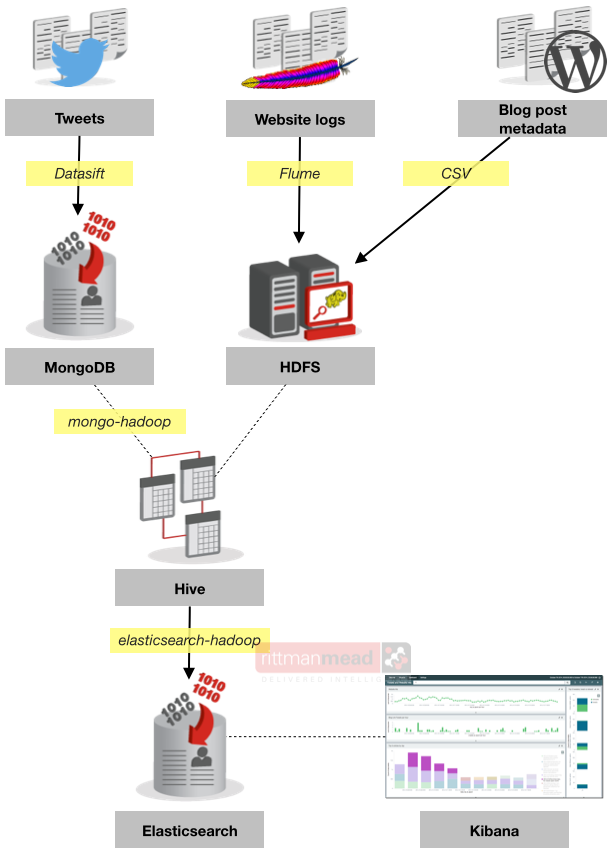
I’ll explain it in steps as follows:
-
Loading the data and making it accessible through Hive
-
Loading data from Hive to Elasticsearch
-
Visualising and analysing data in Kibana
Getting the data into Hive 🔗
Strictly speaking we’re not getting the data into Hive, so much as making it available through Hive. Hive simply enables you to define and query tables sitting on top of data held in places including HDFS. The beauty of the Hadoop ecosystem is that you can physicalise data in a bunch of tools and the components will most often support interoperability with each other. It’s only when you get started playing with it that you realise how powerful this is.
The Apache log files and Wordpress metadata suit themselves fairly well to a traditional RDBMS format of [de]normalised tables, so we can store them in HDFS with simple RDBMS tables defined on top through Hive. But the twitter data comes in JSON format (like this), and if we were going to store the Twitter data in a traditional RDBMS we’d have to work out how to explode the document into a normalised schema, catering for varying structures depending on the type of tweet and data payload within it. At the moment we just want to collect all the data that looks useful, and then look at different ways to analyse it afterwards. Instead of having to compromise one way (force a structure over the variable JSON) or another (not put a relational schema over obviously relational data) we can do both, and decide at run-time how to best use it. From there, we can identify important bits of data and refactor our design as necessary. This “schema on read” approach is one of the real essences of Hadoop and ‘big data’ in general.
So with that said, let’s see how we get the data in. This bit is the easy part of the article to write, because a lot of it is pretty much what Mark Rittman has already written up in his articles, so I’ll refer to those rather than duplicate here.
Apache log data 🔗
References:
I’ve used a variation on the standard Apache log SerDe that the interwebs offers, because I’m going to need to work with the timestamp quite closely (we’ll see why later) so I’ve burst it out into individual fields.
The DDL is:
CREATE EXTERNAL TABLE apachelog (
host STRING,    identity STRING,    user STRING,
time_dayDD STRING,  time_monthMMM STRING,   time_yearYYYY STRING,
time_hourHH STRING, time_minmm STRING,  time_secss STRING,  time_tzZ STRING,
http_call STRING,   url STRING, http_status STRING, status STRING,  size STRING,    referer STRING, agent STRING)
ROW FORMAT SERDE 'org.apache.hadoop.hive.contrib.serde2.RegexSerDe'
WITH SERDEPROPERTIES (
"input.regex" = "([^ ]*) ([^ ]*) ([^ ]*) \\[(\\d{2})\\/(\\w{3})\\/(\\d{4}):(\\d{2}):(\\d{2}):(\\d{2}) (.*?)\\] \\\"(\\w*) ([^ ]*?)(?:\\/)? ([^ \\\"]*)\\\" (\\d*) (\\d*) \\\"(.*?)\\\" \\\"(.*?)\\\"",
"output.format.string" = "%1$s %2$s %3$s %4$s %5$s %6$s %7$s %8$s %9$s %10$s %11$s %12$s %13$s %14$s %15$s %16$s %17$s")
STORED AS TEXTFILE LOCATION '/user/oracle/apache_logs';
The EXTERNAL is important on the table definition as it stops Hive moving the HDFS files into its own area on HDFS. If Hive does move the files it is annoying if you want to also access them through another program (or Hive table), and downright destructive if you DROP the table since it’ll delete the HDFS files too – unless it’s EXTERNAL. Note the LOCATION must be an HDFS folder, even if it just holds one file.
For building and testing the SerDe regex Rubular is most excellent, but note that it’s Java regex you’re specifying in the SerDe which has its differences from Python or Ruby regex that Rubular (and most other online regex testers) support. For the final validation of Java regex I use the slightly ugly but still useful regexplanet, which also gives you the fully escaped version of your regex which you’ll need to use for the actual Hive DDL/DML.
A sample row from the apache log on disk looks like this:
74.208.161.70 - - [12/Oct/2014:03:47:43 +0000] "GET /2014/09/sunday-times-tech-track-100/ HTTP/1.0" 301 247 "-" "-"and now in Hive:
0: jdbc:hive2://bigdatalite:10000> !outputformat vertical
0: jdbc:hive2://bigdatalite:10000> select * from apachelog limit 1;
host           74.208.161.70
identity       -
user           -
time_daydd     12
time_monthmmm  Oct
time_yearyyyy  2014
time_hourhh    03
time_minmm     47
time_secss     43
time_tzz       +0000
http_call      GET
url            /2014/09/sunday-times-tech-track-100/
http_status    HTTP/1.0
status         301
size           247
referer        -
agent          -
Twitter data 🔗
Reference:
The twitter data we’ve got includes the Hive ARRAY datatype for the collections of hashtag(s) and referenced url(s) from within a tweet. A point to note here is that the author_followers data appears in different locations of the JSON document depending on whether it’s a retweet or not. I ended up with two variations of this table and a UNION on top.
The table is mapped on data held in MongoDB and as with the HDFS data above the EXTERNAL is crucial to ensure you don’t trash your data when you drop your table.
CREATE EXTERNAL TABLE tweets
(
id string,
url string,
author string,
content string,
created_at string,
hashtags ARRAY<string>,
referenced_urls ARRAY<string>,
sentiment STRING,
author_handle string,
author_id string,
author_followers string,
author_friends string
)
STORED BY 'com.mongodb.hadoop.hive.MongoStorageHandler'
WITH SERDEPROPERTIES('mongo.columns.mapping'='{"id":"_id","url":"interaction.interaction.link","author":"interaction.interaction.author.name","content":"interaction.interaction.content","created_at":"interaction.interaction.created_at","hashtags":"interaction.interaction.hashtags","referenced_urls":"interaction.links.url","sentiment":"interaction.salience.content.sentiment","author_handle":"interaction.interaction.author.username","author_id":"interaction.interaction.author.id","author_followers":"interaction.twitter.user.followers_count","author_friends":"interaction.twitter.user.friends_count"}')
TBLPROPERTIES('mongo.uri'='mongodb://bigdatalite.localdomain:27017/rm_tweets.rm_tweets')
;
The other point to note is that we’re now using mongo-hadoop for Hive to connect to MongoDB. I found that I had to first build the full set of jar files by running ./gradlew jar -PclusterVersion='cdh5', and also download the MongoDB java driver, before copying the whole lot into /usr/lib/hadoop/lib. This is what I had by the end of it:
[oracle@bigdatalite mongo-hadoop-r1.3.0]$ ls -l /usr/lib/hadoop/lib/mongo-*
-rw-r--r--. 1 root root 105446 Oct 24 00:36 /usr/lib/hadoop/lib/mongo-hadoop-core-1.3.0.jar
-rw-r--r--. 1 root root  21259 Oct 24 00:36 /usr/lib/hadoop/lib/mongo-hadoop-hive-1.3.0.jar
-rw-r--r--. 1 root root 723219 Oct 24 00:36 /usr/lib/hadoop/lib/mongo-hadoop-pig-1.3.0.jar
-rw-r--r--. 1 root root    261 Oct 24 00:36 /usr/lib/hadoop/lib/mongo-hadoop-r1.3.0.jar
-rw-r--r--. 1 root root 697644 Oct 24 00:36 /usr/lib/hadoop/lib/mongo-hadoop-streaming-1.3.0.jar
-rw-r--r--. 1 root root 591189 Oct 24 00:44 /usr/lib/hadoop/lib/mongo-java-driver-2.12.4.jar
After all that, the data as it appears in Hive looks like this:
id                5441097d591f90cf2c8b45a1
url               https://twitter.com/rmoff/status/523085961681317889
author            Robin Moffatt
content           Blogged: Using #rlwrap with Apache #Hive #beeline for improved readline functionality http://t.co/IoMML2UDxp
created_at        Fri, 17 Oct 2014 12:19:46 +0000
hashtags          ["rlwrap","Hive","beeline"]
referenced_urls   ["http://www.rittmanmead.com/blog/2014/10/using-rlwrap-with-apache-hive-beeline-for-improved-readline-functionality/"]
sentiment         4
author_handle     rmoff
author_id         82564066
author_followers  790
author_friends    375
For reference, without the mongo-hadoop connectors I was getting the error
Error in loading storage handler.com.mongodb.hadoop.hive.MongoStorageHandlerand with them installed but without the MongoDB java driver I got:
FAILED: Execution Error, return code 1 from org.apache.hadoop.hive.ql.exec.DDLTask. com/mongodb/util/JSON (state=08S01,code=1)
Caused by: java.lang.ClassNotFoundException: com.mongodb.util.JSON
Wordpress metadata 🔗
Wordpress holds its metadata in a MySQL database, so it’s easy to extract out:
-
Run a query in MySQL to generate the CSV export files, such as:
SELECT p.ID, p.POST_TITLE,p.POST_DATE_GMT, p.POST_TYPE,a.DISPLAY_NAME,p.POST_NAME, CONCAT('/', DATE_FORMAT(POST_DATE_GMT, '%Y'), '/', LPAD( DATE_FORMAT(POST_DATE_GMT, '%c'), 2, '0'), '/', p.POST_NAME) AS generated_url FROM posts p INNER JOIN users a ON p.POST_AUTHOR = a.ID WHERE p.POST_TYPE IN ( 'page', 'post' ) AND p.POST_STATUS = 'publish' into outfile '/tmp/posts.csv' FIELDS TERMINATED BY ',' OPTIONALLY ENCLOSED BY '"' ESCAPED BY '\\' LINES TERMINATED BY '\n'; -
Copy the CSV file to your Hadoop machine, and copy it onto HDFS. Make sure each type of data goes in its own HDFS folder:
hadoop fs -mkdir posts hadoop fs -copyFromLocal /tmp/posts.csv posts -
Define the Hive table on top of it:
CREATE EXTERNAL TABLE posts
( post_id string,title string,post_date string,post_type string,author string,url string ,generated_url string)
ROW FORMAT SERDE 'org.apache.hadoop.hive.contrib.serde2.RegexSerDe'
WITH SERDEPROPERTIES (
"input.regex" = "^(\\d*),\\\"(.*?)\\\",\\\"(.*?)\\\",\\\"(.*?)\\\",\\\"(.*?)\\\",\\\"(.*?)\\\",\\\"(.*?)\\\"",
"output.format.string" = "%1$s %2$s %3$s %4$s %5$s %6$s %7$s")
location '/user/oracle/posts'
;
Rinse & repeat for the category data, and post→category relationships.
The data once modelled in Hive looks like this:
0: jdbc:hive2://bigdatalite:10000> select * from posts limit 1;
post_id        788
title          Blog
post_date      2007-03-07 17:45:07
post_type      page
author         Mark Rittman
url            blog
generated_url  /2007/03/blog

0: jdbc:hive2://bigdatalite:10000> select * from categories limit 1;
category_id    5
cat2_id        5
category_name  category
category_code  BI (General)
catslug        bi

0: jdbc:hive2://bigdatalite:10000> select * from post_cats limit 5;
post_id      8046
category_id  1
The Wordpress metadata quite obviously joins together, as it is already from the relational schema in which it was held on MySQL. Here is an example of where “schema on read” comes into play, because you could look at the above three tables (posts / post_cats / categories) and conclude it was redundant to export all three from Wordpress and instead a single query listings posts and their respective category would be sufficient. But, some posts have more than one category, which then leads to a design/requirements decision. Either we retain one row per post - and collapse down the categories, but in doing so lose ability to easily treat categories as individual data - or have one row per post/category, and end up with multiple rows per post which if we’re doing a simple count of posts complicates matters. So we bring it in all raw from source, and then decide how we’re going to use it afterwards.
Bringing the data together 🔗
At this point I have six tables in Hive that I can query (albeit slowly) with HiveQL, a close relation to SQL with a few interesting differences running through the Hive client Beeline. The data is tweets, website visits, and details about the blog posts themselves.
0: jdbc:hive2://bigdatalite:10000> show tables;
+------------------------+
|        tab_name        |
+------------------------+
| apachelog              |
| categories             |
| post_cats              |
| posts                  |
| retweets               |
| tweets                 |
+------------------------+
As well as time, the other common element running throughout all the data is the blog article URL, whether it is a post, a visit to the website, or a tweet about it. But to join on it is not quite as simple as you’d hope, because all the following are examples of recorded instances of the data for the same blog post:
http://www.rittmanmead.com/blog/2014/01/automated-regression-testing-for-obiee/
/2014/01/automated-regression-testing-for-obiee/
/2014/01/automated-regression-testing-for-obiee
/2014/01/automated-regression-testing-for-obiee/feed
/2014/01/automated-regression-testing-for-obiee/foobar+foobar
So whether it’s querying the data within Hive, or loading it joined together to another platform, we need to be able to unify the values of this field.
Tangent: RegEx 🔗
And now it’s time, if you’d not already for your SerDe against the Apache file, to really immerse yourself in Regular Expressions (RegEx). Part of the “schema on read” approach is that it can get messy. You need to juggle and wrangle and munge data in ways that it really might not want to, and RegEx is an essential tool with which to do this. Regex isn’t specific to Hadoop - it’s used throughout the computing world.
My journey with regex over quite a few years in computing has gone in stages something like this:
-
To be a fully rounded geek, I should learn regex. Looks up regex. Hmm, looks complicated….Squirrel!
-
To be a fully round (geddit?!) geek, I should keep eating these big breakfasts
-
I’ve got a problem, I’ve got a feeling regex will help me. But my word it looks complicated … I’ll just do it by hand.
-
I’ve got another problem, I need to find this text in a file but with certain patterns around it. Here’s a regex I found on google. Neat!
-
Hmmm another text matching problem, maybe I should really learn regex instead of googling it to death each time
-
Mastered the basic concepts of regex
-
Still a long way to go…
If you think you’ll nail RegEx overnight, you won’t (or at least, you’re a better geek than me). It’s one of those techniques, maybe a bit like SQL, that to fully grok takes a period of exposure and gradually increasing usage, before you have an “ah hah!” moment. There’s a great site explaining regex here: www.regular-expressions.info. My best advice is to take a real example text that you want to work with (match on, replace bits of, etc), and stick it in one of these parsers and experiment with the code:
-
Oyster (Mac tool)
Oh and finally, watch out for variations in regex - what works in a Java-based program (most of the Hadoop world) may not in Python and visa versa. Same goes for PHP, Ruby, and so on - they all have different regex engines that may or may not behave as you’d expect.
Back on track : joining data on non-matching columns 🔗
So to recap, we want to be able to analyse our blog data across tweets, site hits and postings, using the common field of the post URL, which from the various sources can look like any of the following (and more):
http://www.rittmanmead.com/blog/2014/01/automated-regression-testing-for-obiee/
/2014/01/automated-regression-testing-for-obiee/
/2014/01/automated-regression-testing-for-obiee
/2014/01/automated-regression-testing-for-obiee/feed
/2014/01/automated-regression-testing-for-obiee/foobar+foobar
So out comes the RegEx. First off, we’ll do the easy one - strip the http:// and server bit. Using the Hive function REGEXP_REPLACE we can use this in the query:
regexp_replace(ref_url,'http:\\/\\/www.rittmanmead.com','')This means, take the ref_url column and if you find http://www.rittmanmead.com then replace it with nothing, i.e. delete it. The two backslashes before each forward slash simply escape them since a forward slash on its own has a special meaning in regex. Just to keep you on your toes - Java regex requires double backspace escaping, but all other regex (including the online parser I link to below) uses a single one.
So now our list possible join candidates has shrunk by one to look like this:
/2014/01/automated-regression-testing-for-obiee/
/2014/01/automated-regression-testing-for-obiee
/2014/01/automated-regression-testing-for-obiee/feed
/2014/01/automated-regression-testing-for-obiee/foobar+foobar
The variation as you can see is whether there is a trailing forward slash (/) after the post ‘slug’ , and whether there is additional cruft after that too (feed, foobar+foorbar, etc). So let’s build it up a piece at a time. On each one, I’ve linked to an online parser that you can use to see it in action.
-
We’ll match on the year and month (
/2014/01/) because they’re fixed pattern, so using\dto match on digits and{x}to match x repetitions: (see example on Rubular.com)\/\d{4}\/\d{2}\/
This will match /2014/01/.
. Now we need to match the slug, but we’re going to ditch the forward slash suffix if there is one. This is done with two steps.
First, we define a “match anything except x” group, which is what the square brackets (group) and the caret ^ (negate) do, and in this case x is the forward slash character, escaped.
Secondly, the plus symbol + tells regex to match at least one repetitions of the preceeding group - i.e. any character that is not a forward slash. (example)
[^\/]+Combined with the above regex from the first step we will now match /2014/01/automated-regression-testing-for-obiee.
. The final step is to turn the previous REGEXP_REPLACE on its head and instead of replacing out content from the string that we don’t want, instead we’ll extract the content that we do want, using a regex capture group which is defined by regular brackets (parantheses, just like these). We’ve now brought in a couple of extra bits to make it hang together, seen in the completed regex here:
\S*(\/\d{4}\/\d{2}\/[^\/]+).*$-
The
\S*at the beginning means match any non-whitespace character, which will replace the previous regex replace we were doing to strip out thehttp://www.rittmanmead.com -
After the capture group, which is the content from steps one and two above, surround by parentheses
(\/\d{4}\/\d{2}\/[^\/]+)there is a final.*to match anything else that might be present (eg trailing forward slash,foobar, etc etc)
Now all we need to do is escape it for Java regex, and stick it in the Hive REGEXP_EXTRACT function, specifying 1 as the capture group number to extract: (example)
regexp_extract(url,'\\S*(\\/\\d{4}\\/\\d{2}\\/[^\\/]+).*',1)So now all our URLs will look like this, regardless of whether they’re from tweet data, website hits, or wordpress:
/2014/01/automated-regression-testing-for-obieeWhich is nice, because it means we can use it as the common join in our queries. For example, to look up the title of the blog post that someone has tweeted about, and who wrote the post:
SELECT
x.author AS tweet_author,
x.tweet ,
x.tweet_url,
x.created_at,
p.author as post_author,
p.title as post_title
FROM            (
SELECT 'tweets' ,
t.url AS tweet_url ,
t.author ,
t.content AS tweet ,
t.created_at ,regexp_extract(ref_url,'\\S*(\\/\\d{4}\\/\\d{2}\\/[^\\/]+).*',1) as url
FROM   tweets t
LATERAL VIEW EXPLODE (referenced_urls) refs as ref_url
WHERE  t.author_followers IS NOT NULL
AND    ref_url regexp '\\S*\\/\\d{4}\\/\\d{2}\\/.*' ) x
INNER JOIN posts p
ON regexp_extract(x.url,'\\S*(\\/\\d{4}\\/\\d{2}\\/[^\\/]+).*',1) = p.generated_url ;

[...]
tweet_author  Dain Hansen
tweet         Like a Big Data kid in a Hadoop candy store: Presos on #bigdata for BI, DW, Data Integration http://t.co/06DLnvxINx via @markrittman
tweet_url     https://twitter.com/dainsworld/status/520463199447961600
created_at    Fri, 10 Oct 2014 06:37:51 +0000
post_author   Mark Rittman
post_title    Upcoming Big Data and Hadoop for Oracle BI, DW and DI Developers Presentations

tweet_author  Robin Moffatt
tweet         Analyzing Twitter Data using Datasift, MongoDB and Pig http://t.co/h67cd4kJo2 via @rittmanmead
tweet_url     https://twitter.com/rmoff/status/524197131276406785
created_at    Mon, 20 Oct 2014 13:55:09 +0000
post_author   Mark Rittman
post_title    Analyzing Twitter Data using Datasift, MongoDB and Pig
[...]
Note here also the use of LATERAL VIEW EXPLODE () as a way of denormalising out the Hive ARRAY of referenced url(s) in the tweet so there is one row returned per value.
Summary 🔗
We’ve got our three sources of data available to us in Hive, and can query across them. Next we’ll take a look at loading the data into Elasticsearch, taking advantage of our conformed url column to join data that we load. Stay tuned!
| This post originally appeared on the Rittman Mead blog. |