
| This post originally appeared on the Rittman Mead blog. |
A little-known new feature of OBIEE 11g is a web service interface to the BI Server. Called the “BI Server Metadata Web Service” it gives a route into making calls into the BI Server using SOAP-based web services calls. Why is this useful? Because it means you can make any call to the BI Server (such as SAPurgeAllCache) from any machine without needing to install any OBIEE-related artefacts such as nqcmd, JDBC drivers, etc. The IT world has been evolving over the past decade or more towards a more service-based architecture (remember the fuss about SOA?) where we can piece together the functionality we need rather than having one monolithic black box trying to do everything. Being able to make use of this approach in our BI deployments is a really good thing. We can do simple things like BI Server cache management using a web service call, but we can also do more funky things, such as actually updating repository variable values in real time - and we can do it from within our ETL jobs, as part of an automated deployment script, and so on.
Calling the BI Server Metadata Web Service 🔗
First off, let’s get the web service configured and working. The documentation for the BI Server Metadata Web Service can be found here, and it’s important to read it if you’re planning on using this. What I describe here is the basic way to get it up and running.
Configuring Security 🔗
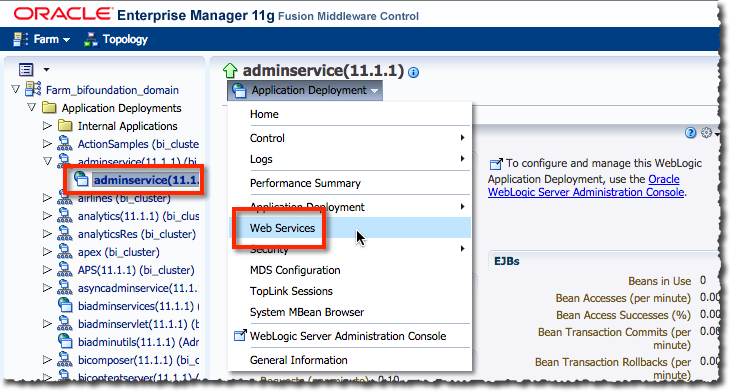
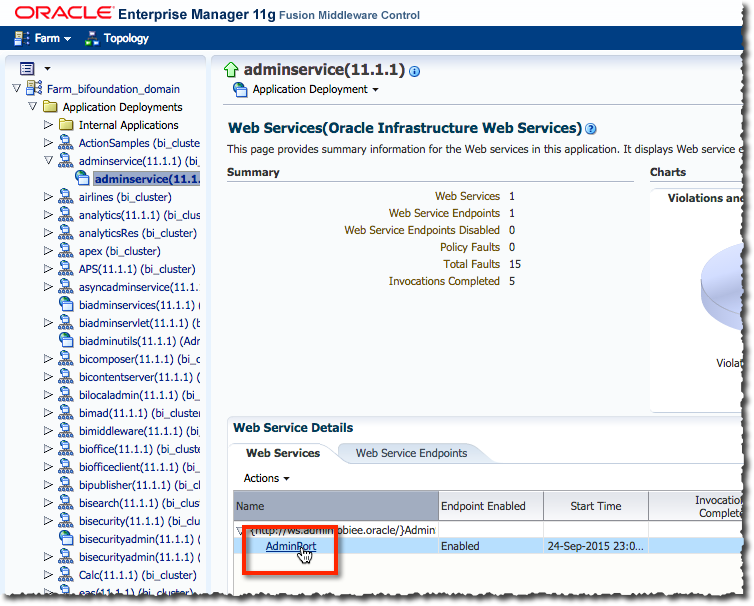
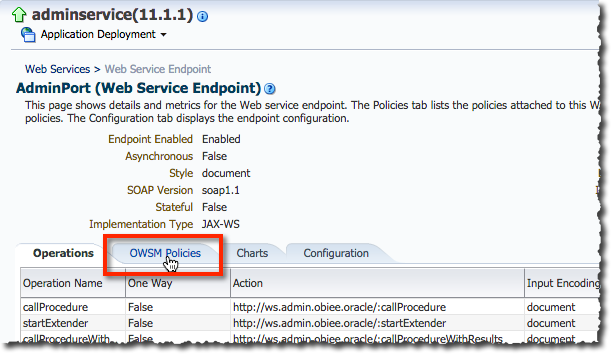
We need to configure the security against the web service to define what kind of authentication is required by it to use. If you don’t do this, you won’t be able to make calls to it. Setting up the security is a case of attaching a security policy in WebLogic Server to the web service (called AdminService) itself. I’ve used oracle/wss_http_token_service_policy which means that the credentials can be passed through using standard HTTP Basic authentication.
You can do this through Enterprise Manager:
| This post originally appeared on the Rittman Mead blog. |