
| This post originally appeared on the Rittman Mead blog. |
In my previous blog post I introduced Spark Streaming and how it can be used to process 'unbounded' datasets. The example I did was a very basic one - simple counts of inbound tweets and grouping by user. All very good for understanding the framework and not getting bogged down in detail, but ultimately not so useful.
We’re going to stay with Twitter as our data source in this post, but we’re going to consider a real-world requirement for processing Twitter data with low-latency. Spark Streaming will again be our processing engine, with future posts looking at other possibilities in this area.
Twitter has come a long way from its early days as a SMS-driven "microblogging" site. Nowadays it’s used by millions of people to discuss technology, share food tips, and, of course, track the progress of tea-making. But it’s also used for more nefarious purposes, including spam, and sharing of links to pirated material. The requirement we had for this proof of concept was to filter tweets for suspected copyright-infringing links in order that further action could be taken.
The environment I’m using is the same as before - Spark 2.0.2 running on Docker with Jupyter Notebooks to develop the code (and this article!). You can download the full notebook here.
The inbound tweets are coming from an Apache Kafka topic. Any matched tweets will be sent to another Kafka topic. The match criteria are:
-
Not a retweet
-
Contains at least one URL
-
URL(s) are not on a whitelist (for example, we’re not interested in links to spotify.com, or back to twitter.com)
-
The Tweet text must match at least two from a predefined list of artists, albums, and tracks. This is necessary to avoid lots of false positives - think of how many music tracks there are out there, with names that are common in English usage ("yesterday" for example). So we must match at least two ("Yesterday" and "Beatles", or "Yesterday" and "Help!").
-
Match terms will take into account common misspellings (Little Mix → Litle Mix), hashtags (Little Mix → #LittleMix), etc
We’ll also use a separate Kafka topic for audit/debug purposes to inspect any non-matched tweets.
-
As well as matching the tweet against the above conditions, we will enrich the tweet message body to store the identified artist/album/track to support subsequent downstream processing.
The final part of the requirement is to keep track of the number of inbound tweets, the number of matched vs unmatched, and for those matched, which artists they were for. These counts need to be per batch and over a window of time too.
Getting Started - Prototyping the Processing Code 🔗
Before we get into the meat of the streaming code, let’s take a step back and look at what we’re wanting the code to achieve. From the previous examples we know we can connect to a Kafka topic, pull in tweets, parse them for given fields, and do windowed counts. So far, so easy (or at least, already figured out!). Let’s take a look at nub of the requirement here - the text matching.
If we peruse the BBC Radio 1 Charts we can see the popular albums and artists of the moment (Grant me a little nostalgia here; in my day people 'pirated' music from the Radio 1 chart show onto C90 cassettes, trying to get it without the DJ talking over the start and end. Nowadays it’s done on a somewhat more technologically advanced basis). Currently it’s "Little Mix" with the album "Glory Days". A quick Wikipedia or Amazon search gives us the track listing too:
  1. Shout Out to My Ex
  2. Touch
  3. F.U.
  4. Oops - Little Mix feat. Charlie Puth
  5. You Gotta Not
  6. Down & Dirty
  7. Power
  8. Your Love
  9. Nobody Like You
  10. No More Sad Songs
  11. Private Show
  12. Nothing Else Matters
  13. Beep Beep
  14. Freak
  15. Touch
A quick twitter search for the first track title gives us this tweet - I have no idea if it’s legit or not, but it serves as an example for our matching code requirements:
Using the Twitter developer API I can retrieve the JSON for this tweet directly. I’m using the excellent Paw tool to do this.
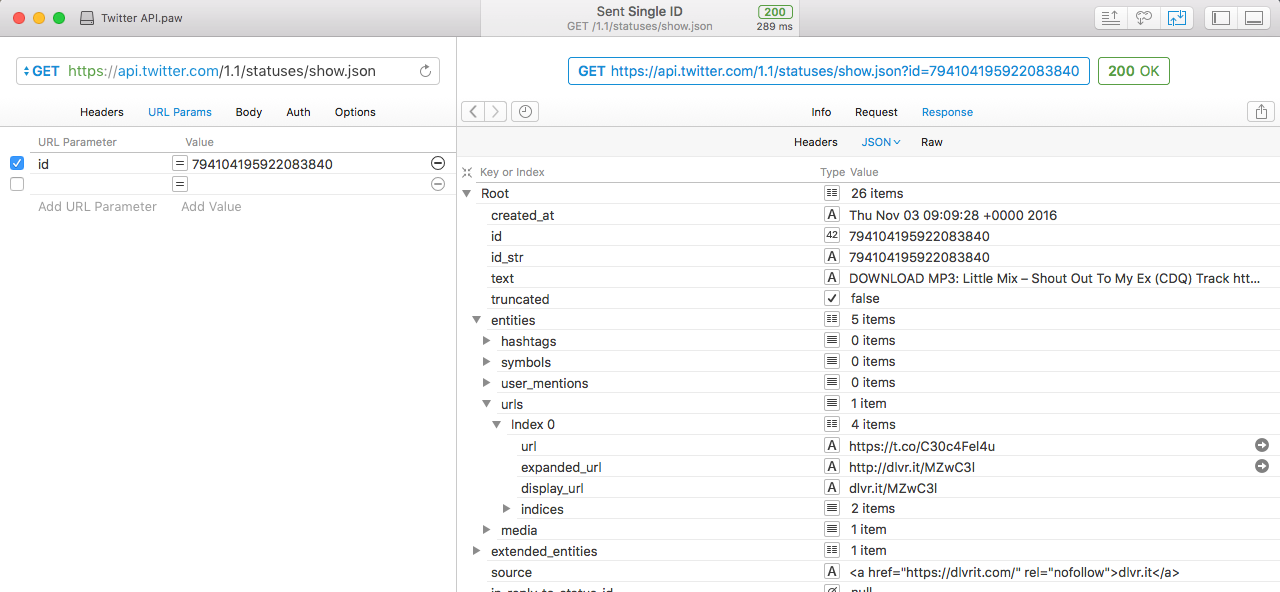
From this we can get the text element:
"text": "DOWNLOAD MP3: Little Mix \u2013 Shout Out To My Ex (CDQ) Track https:\/\/t.co\/C30c4Fel4u https:\/\/t.co\/wJjyG4cdjE",The obvious approach would be to have a list of match terms, something like:
match_text=("Little Mix","Glory Days","Shout Out to My Ex","Touch","F.U.")But - we need to make sure we’ve matched two of the three types of metadata (artist/album/track), so we need to know which it is that we’ve matched in the text. We also need to handle variations in text for a given match (such as misspellings etc).
What I came up with was this:
filters=[]
filters.append({"tag":"album","value": "Glory Days","match":["Glory Days","GloryDays"]})
filters.append({"tag":"artist","value": "Little Mix","match":["Little Mix","LittleMix","Litel Mixx"]})
filters.append({"tag":"track","value": "Shout Out To My Ex","match":["Shout Out To My Ex","Shout Out To My X","ShoutOutToMyEx","ShoutOutToMyX"]})
filters.append({"tag":"track","value": "F.U.","match":["F.U","F.U.","FU","F U"]})
filters.append({"tag":"track","value": "Touch","match":["Touch"]})
filters.append({"tag":"track","value": "Oops","match":["Oops"]})

def test_matching(test_string):
    print 'Input: %s' % test_string
    for f in filters:
        for a in f['match']:
            if a.lower() in test_string.lower():
                print '\tTag: %s / Value: %s\n\t\t(Match string %s)' % (f['tag'],f['value'],a)
We could then take the test string from above and test it:
test_matching('DOWNLOAD MP3: Little Mix \u2013 Shout Out To My Ex (CDQ) Track https:\/\/t.co\/C30c4Fel4u https:\/\/t.co\/wJjyG4cdjE')Input: DOWNLOAD MP3: Little Mix \u2013 Shout Out To My Ex (CDQ) Track https:\/\/t.co\/C30c4Fel4u https:\/\/t.co\/wJjyG4cdjE
Tag: artist / Value: Little Mix
(Match string Little Mix)
Tag: track / Value: Shout Out To My Ex
(Match string Shout Out To My Ex)as well as making sure that variations in naming were also correctly picked up and tagged:
test_matching('DOWNLOAD MP3: Litel Mixx #GloryDays https:\/\/t.co\/wJjyG4cdjE')Input: DOWNLOAD MP3: Litel Mixx #GloryDays https:\/\/t.co\/wJjyG4cdjE
Tag: album / Value: Glory Days
(Match string GloryDays)
Tag: artist / Value: Little Mix
(Match string Litel Mixx)Additional Processing 🔗
With the text matching figured out, we also needed to address the other requirements:
-
Not a retweet
-
Contains at least one URL
-
URL(s) are not on a whitelist (for example, we’re not interested in links to spotify.com, or back to twitter.com)
==== Not a Retweet
-
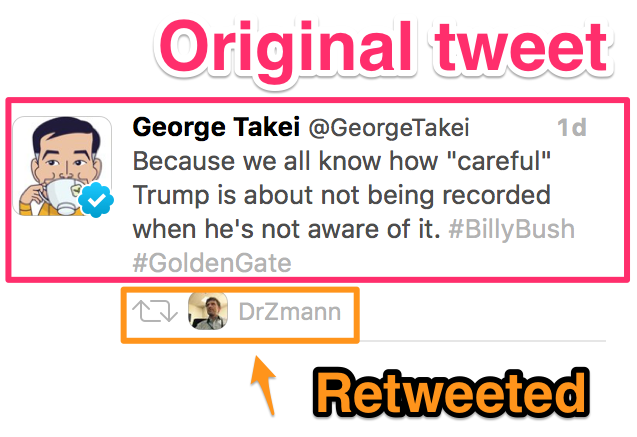
In the old days retweets were simply reposting the same tweet with a RT prefix; now it’s done as part of the Twitter model and Twitter clients display the original tweet with the retweeter shown. In the background though, the JSON is different from an original tweet (i.e. not a retweet).
Original tweet:
Because we all know how "careful" Trump is about not being recorded when he's not aware of it. #BillyBush #GoldenGate
— George Takei (@GeorgeTakei) January 12, 2017
{
  "created_at": "Thu Jan 12 00:36:22 +0000 2017",
  "id": 819342218611728384,
  "id_str": "819342218611728384",
  "text": "Because we all know how \"careful\" Trump is about not being recorded when he's not aware of it. #BillyBush #GoldenGate",

[...]Retweet:
| This post originally appeared on the Rittman Mead blog. |